How to Start an Ecommerce Website: A Practical Guide for New Merchants

how to start an ecommerce website

Starting an online store is not simply uploading products and switching on checkout. Your website needs to show shoppers what you sell, why it is worth buying, and what happens after an order is placed.

Knowing how to start an ecommerce website helps merchants make better decisions before spending on a theme, apps, or advertising. Start with the product, customer, and buying journey. Design should support those decisions, not cover gaps in the store plan.how to start an ecommerce website

How to Start an Ecommerce Website With a Clear Plan

Define your product range, target customer, pricing, and fulfillment process before building pages.

Prepare key information for every product: SKU, title, price, variants, stock level, shipping weight, images, specifications, and delivery estimate.

Decide what shoppers need to know before ordering, which items belong in the same collection, how returns will work, and how customers can reach support. Those answers shape the navigation, product copy, photography, policy pages, and shipping settings.

If you want to turn these initial decisions into a structured, profitable roadmap, using formal Shopify launch planning ensures your store infrastructure handles scaling data from day one.

Choose Your Platform, Domain, and Essential Pages

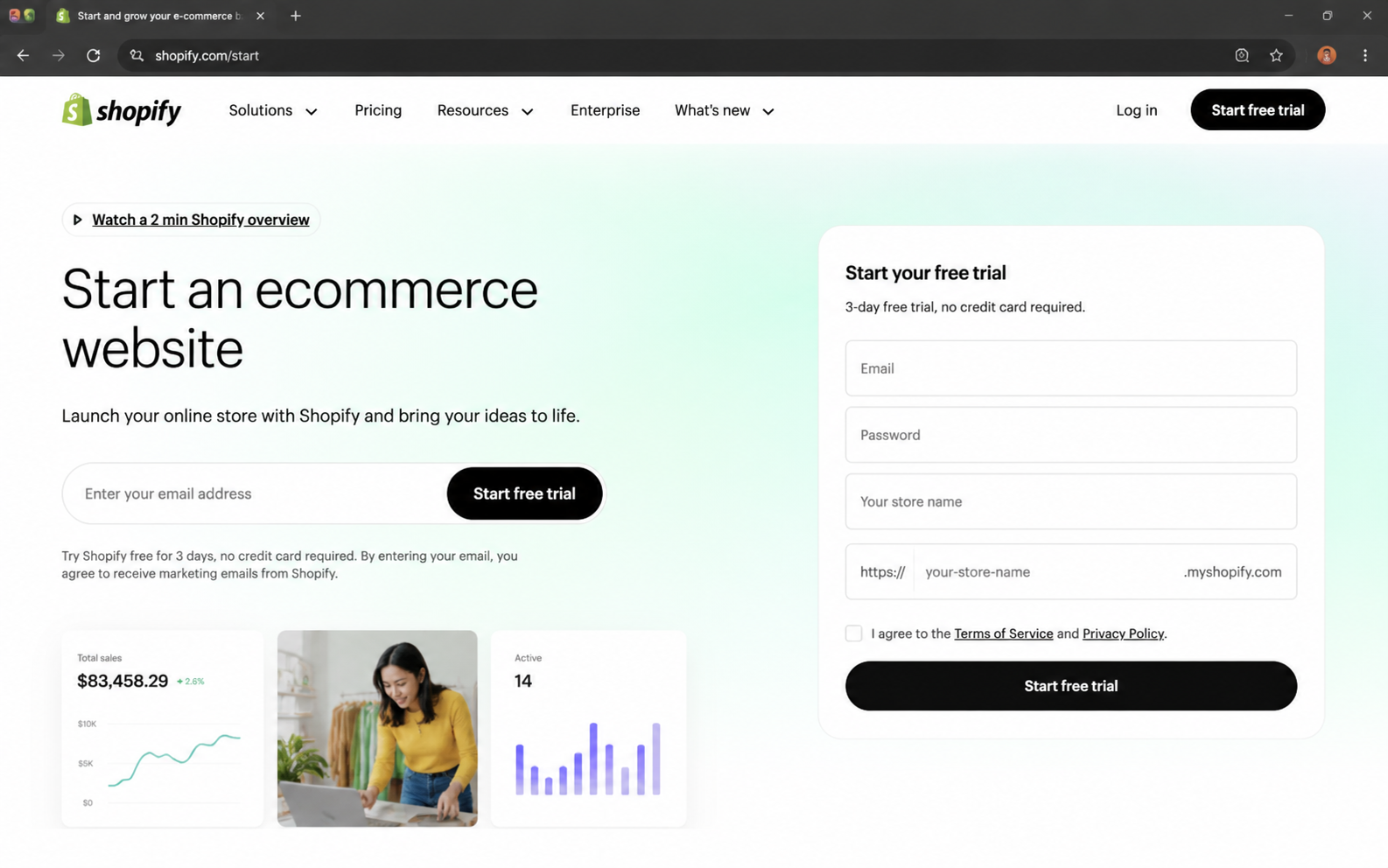
For many new merchants, Shopify brings product management, payments, storefront tools, and checkout into one system. Choose a plan that fits the business you are launching now.

Register a short domain close to your brand name and use a branded support email. Avoid names that are difficult to spell or remember.

Build the core pages customers should be able to find quickly:

  • Home page
  • Collection pages
  • Product pages
  • About page
  • Contact page
  • Shipping and returns page
  • Privacy policy and terms
  • FAQ page

Shoppers should not need to hunt for delivery estimates, sizing details, return terms, or a way to contact the business.
how to start an ecommerce website

Create Product Pages That Answer Buying Questions

Product pages should answer the questions that matter before purchase. Use original photos from several angles, with close-ups when material, texture, or small details affect the decision.

Cover the main benefit, materials or specifications, dimensions or fit, variants, what is included, care instructions, and relevant limitations. Keep the price, options, delivery details, and add-to-cart button easy to find.

Always benchmark your store experience on mobile devices before flipping the live switch. Product images must load instantly, variants must be simple to select, and checkout CTA buttons must remain actionable on smaller viewports. If a stock theme breaks under your catalog specifications, investing in professional mobile-first Shopify website design guarantees a friction-free mobile journey without reliance on messy custom workarounds.

Use This Ecommerce Website Launch Checklist

When learning how to start an ecommerce website, it is easy to focus on the homepage and miss settings that affect orders after payment. Review this checklist before launch.

Store Area What to Prepare Why It Matters
Products Prices, variants, stock, images, and descriptions Prevents incomplete or confusing listings
Payments Payment methods and test transactions Helps customers complete checkout correctly
Shipping Rates, delivery estimates, and return instructions Sets expectations before purchase
Store Pages Contact details, FAQs, policies, and shipping information Gives customers answers before they contact support
Mobile Experience Navigation, product options, add-to-cart, and checkout Supports customers shopping on phones
Customer Emails Order, shipping, refund, and support messages Keeps customers informed after payment
Launch Testing Discounts, tax, inventory, checkout, and notifications Finds setup errors before customers do

Run test orders on desktop and mobile. Check discounts, shipping rates, confirmation emails, inventory updates, and refund steps.

Keep Design, Apps, and Store Speed Under Control

Choose a theme based on the product range and how customers shop. Premium products may need more space for visuals, while larger catalogs need clear navigation, filters, and search.

A ready-to-customize Shopify template can be a practical starting point for a straightforward store. It should still make it easy to browse collections and reach checkout.

Install apps only when they solve a clear problem, such as subscriptions, reviews, shipping rules, email capture, or stock notifications. Too many apps can add cost, create maintenance work, and slow the storefront. A regular Shopify storefront speed optimization can help identify heavy images, theme code, or app scripts that affect loading time.

For complex product rules, third-party connections, or an unusual buying journey, tailored Shopify development may be more suitable than forcing those requirements into a generic theme.

Configure Payments, Shipping, and Customer Communication

Set payment methods that suit the markets you serve, then test them before customers see the store. Configure tax settings carefully and seek local professional advice when required.

Set shipping rates that reflect fulfillment costs. Free shipping can work when margins support it or above a sensible order threshold. Display processing and delivery estimates clearly.

Create direct automated emails for order confirmation, dispatch, refunds, and support updates. Customers should understand their order status without writing to your team.

How to Start an Ecommerce Website That Can Grow

Learning how to start an ecommerce website does not mean launching every possible feature on day one. The best first version gives customers a clean value proposition, reliable checkout, and accurate post-purchase tracking updates. Launch with the core essentials, then use sales data and buyer behavior to decide what to optimize next.

Launch with the essentials, then use customer questions, sales data, and checkout behavior to decide what to improve. Zissu Global helps scaling merchants build resilient Shopify architectures, engineering high-converting product discovery paths, fast responsive frameworks, and custom workflows tailored to your unique operation.

How to Sell on Shopify Without Inventory: A Practical Guide for New Merchants

how to sell on shopify without inventory

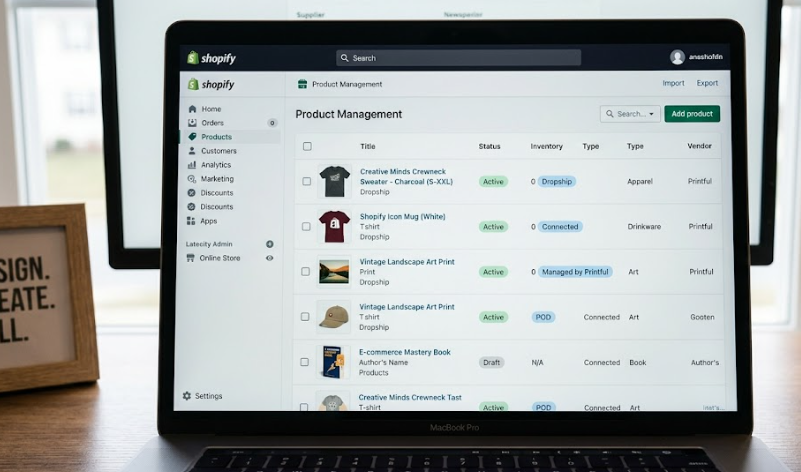
You do not need to buy, store, or pack every product yourself to run an online store. However, you still need dependable suppliers, accurate delivery information, clear product pages, and responsive customer support.

Learning how to sell on Shopify without inventory means choosing a fulfillment model that fits the products you want to offer and the customer experience you can manage. It does not remove responsibility for orders, refunds, or product information.

how to sell on shopify without inventory

Selecting Your Inventory-Free Fulfilment Model

The first decision in how to sell on Shopify without inventory is deciding what you will sell and who will fulfil each order. Three common options are dropshipping, print on demand, and digital products.

Model How Orders Are Fulfilled Best Fit Main Watch-Out
Dropshipping A supplier stores and ships the product after purchase Curated physical products Quality and delivery depend on the supplier
Print on demand A partner produces and ships an item after purchase Branded apparel and simple custom goods Production times and margins vary
Digital products Customers receive files, access, or licenses online Guides, templates, and downloads The offer must provide clear value

When expanding an inventory-free store, you must constantly balance your core product margins, supplier delivery benchmarks, and the post-purchase customer support overhead each model creates.

Check Suppliers Before Building the Store

A supplier affects the customer experience as much as the storefront. Order samples where possible and inspect product quality, packaging, delivery time, tracking accuracy, and communication.

Ask about stock updates, processing time, shipping origins, order fees, return procedures, replacement policies, and whether items can ship together.

Before spending money on marketing, using professional Shopify business-model planning helps you vet your supply chain, calculate shipping timelines, and map your operational requirements to ensure a smooth launch.

Calculate Margin and Service Costs Before You Price Products

Selling without stock does not mean selling without costs. Before setting a retail price, calculate supplier charges, shipping, transaction fees, app costs, refunds, replacements, chargebacks, and customer-service time.

Cost Area What to Check
Supplier cost Product price, per-order charges, packaging, and minimums
Shipping Rates, tracking, delivery times, and multi-item shipments
Store costs Shopify plan, payment charges, apps, domain, and email
Returns Return label, replacement item, and refund policy

A low purchase price can become unprofitable when delivery delays or refunds are frequent. Start with a smaller range from reliable suppliers instead of a large catalogue with unclear stock and shipping data.

Optimizing Product Pages for Transparency and Trust

Successfully managing orders without physical stock relies heavily on setting accurate expectations before checkout. Clearly state product materials, sizing charts, and compatibility limitations.

Shoppers need absolute clarity before buying. If you are offering custom or print-on-demand items, implementing tailored Shopify product-page design support ensures your trust signals, shipping origins, and estimated delivery windows remain clean and easy to find on both desktop and mobile layouts. Do not simply copy a supplier’s generic product description without validating it.

How to Sell on Shopify Without Inventory With Reliable Order Flow

Once orders begin, the store needs a clear path for sending order details to suppliers, receiving tracking information, and updating customers. Check whether the supplier app, order-management system, or manual workflow can handle these steps without duplicate orders or missing updates.

When planning how to sell on Shopify without inventory across multiple suppliers, decide how partial shipments, unavailable items, address changes, cancellations, and refunds will be handled. One order may arrive in separate packages when products come from different locations.

Use stock syncing where possible and review unavailable items quickly. If your store routes orders to multiple separate fulfillment houses, using independent apps can lead to errors and missing tracking data. Commissioning custom Shopify supplier integrations builds a unified connection directly into your admin panel, ensuring that automated stock syncing and automated tracking updates occur without manual work.

Keep Compliance, Returns, and Support Under Control

A supplier fulfilling an order does not remove your responsibility to customers. Review product safety requirements, restrictions, and shipping rules for the markets you serve. Check that products have appropriate instructions, warnings, and documentation where needed.

Publish clear shipping and returns policies. State processing times, delivery estimates, possible customs costs, and return requirements before customers pay.

A responsible approach to how to sell on Shopify without inventory includes owning customer communication when a supplier makes a mistake. Respond to delays quickly, keep tracking accessible, and document recurring supplier issues.

Test the Customer Journey Before Launch

Before publishing, place a test order and review the experience as a customer. Check product information, shipping rates, taxes, order confirmation, supplier notification, tracking updates, and refund steps.

Test a multi-item order, an address change, and a cancellation or return scenario.

Conclusion: How to Sell on Shopify Without Inventory Responsibly

Knowing how to sell on Shopify without inventory requires more than importing products and waiting for checkout notifications. Success depends on verifying your suppliers, protecting your margins, setting honest delivery expectations, and structuring an automated fulfillment loop.

Zissu Global helps Shopify merchants launch product-led stores, engineering custom supplier frameworks, efficient order-routing logic, and storefront experiences that support sustainable revenue growth.

How to Edit Pages in Shopify: A Practical Guide for Merchants

how to edit pages in shopify

A small page update can affect what shoppers understand, whether they trust the store, and how easily they can complete a task. Editing an About page, shipping message, or campaign landing page should be more deliberate than changing a sentence.

Learning how to edit pages in shopify starts with identifying what you are changing. Shopify separates page content, product data, navigation, policies, and theme layout, so using the right area prevents accidental storefront changes.

how to edit pages in shopify

Locating Content Assets Within the Core Ecosystem

Before diving into how to edit pages in shopify, you must accurately isolate the underlying architecture of the content asset you want to update. A standard content layout, product record, collection matrix, store policy, or navigation menu each exist within distinct database sectors in the backend.

What You Need to Change Where to Edit It Example
Standard content page Online Store > Pages About, contact, shipping, or returns page
Product information Products Title, description, price, media, or variants
Collection information Products > Collections Collection title, description, image, or rules
Blog content Content > Blog posts Guide, announcement, or article
Store policy Settings > Policies Refund, privacy, shipping, or terms policy
Store navigation Content > Menus Header, footer, and menu links

Collection descriptions are edited in the collection record, while layout is controlled by the assigned theme template. Check whether a change affects one resource or a shared menu, section, or template before saving.

How to Edit Pages in Shopify From the Admin

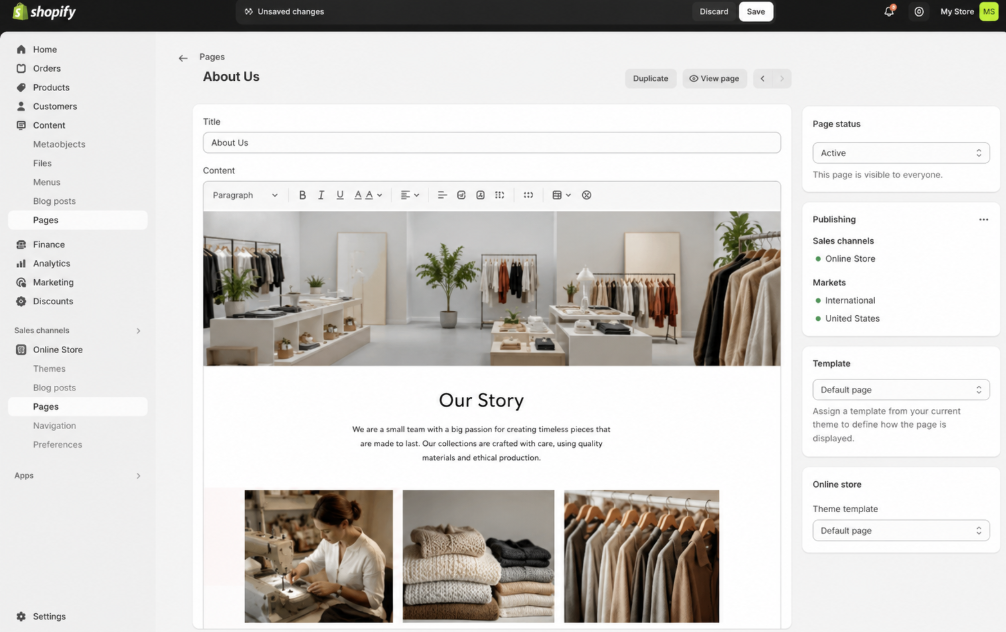
For standard, static content layouts, how to edit pages in shopify begins at Online Store > Pages. Select the page title, update the content or settings, choose the correct visibility, and save.

A Shopify page works within a content management system. Use the rich-text editor for clear headings, links, images, tables, or embedded content, but keep each page focused on one job. Preview formatting before saving when a page includes tables, images, or embedded content.

Keep compatibility, care, warranty, or size guidance on the relevant product page or product template. Placing product-specific details on a generic policy page can create conflicting information across the catalogue.

How to Edit Pages in Shopify With the Theme Editor

Go to Online Store > Themes, select Edit theme, then use the page or template selector to find the layout you need to change.

The theme editor controls sections and blocks, including banners, FAQs, forms, featured collections, and image areas. Use it when a page needs a new section order, a different image, or a better mobile layout rather than when only its written content needs updating.

Check the page on desktop and mobile. A wide hero image, oversized heading, or stack of promotions can make a page harder to use on a phone.  Mobile-focused Shopify page design can help when the problem is visual structure rather than wording.

How to Edit Pages in Shopify With Templates

Templates keep similar resources consistent. When learning how to edit pages in shopify through templates, confirm whether the template is shared by several pages, products, collections, blogs, or posts.

Changing a shared template can update every assigned resource. Create a separate template when one campaign page or product group needs a different section arrangement, then assign it only to the relevant resource.

For pages that need conditional content, calculators, custom forms, or extra data fields, custom shopify page features are vastly superior to forcing theme components past their operational limits.

How to Edit Pages in Shopify for Search and Navigation

How to edit pages in shopify also includes what people see before they reach the page. In the page editor, review the search-engine listing fields for the page title, meta description, and URL handle.

Use a title that states the page purpose. The meta description should summarize what shoppers will find, not repeat the same phrase. Change a published URL only when needed. Afterward, create or confirm a redirect under Content > Menus > URL redirects, then test the old address.

A new page is not automatically added to the header or footer. Check the relevant menu under Content > Menus and add or update the link where shoppers should find it. As your catalog inventory expands, executing professional shopify site-structure development ensures your internal link equity flows cleanly through descriptive menus, preventing dead ends and keeping the store path indexable for search crawlers. 

Preview Changes Before Publishing

How to edit pages in shopify safely means reviewing the customer view before a change goes live. Check the final page on desktop and mobile, test every new link, and confirm that the correct template is assigned.

For larger layout changes, use the theme editor preview before publishing. Check key sections, product cards, menu links, forms, and app blocks so a page-level change does not create a problem elsewhere in the storefront.

Do not change policy text, delivery claims, return terms, or promotional messages without confirming that they match current operations.

how to edit pages in shopify

Conclusion: How to Edit Pages in Shopify With Control

Good page editing means selecting the right Shopify area, making focused changes, checking the customer view, and keeping navigation and search details accurate. Start with content, use templates carefully, and review the impact of shared layouts before publishing.

Zissu Global helps scaling merchants architect robust storefront systems, engineering pristine page layouts, custom data schemas, and optimized store navigation paths that align perfectly with your core business logic.

How to Do SEO for Shopify Website: A Practical Guide for Merchants

how to do seo for shopify website

A Shopify store can have strong products and attractive design but receive little organic traffic when search engines cannot understand its pages or shoppers cannot find what they need.

Learning how to do seo for shopify website starts with clear product pages, useful collection pages, logical navigation, accurate metadata, and reliable page speed. The goal is not to place keywords everywhere. It is to make important pages easier to understand.

how to do seo for shopify website

Mapping Intent Across the Ecommerce Funnel

Identify the words customers use when searching for products like yours. Focus on terms that match a page’s purpose and the stage of the buying journey.

A shopper searching “women’s waterproof hiking boots” exhibits transaction intent targeted at a collection layout. Conversely, someone searching “how to clean waterproof hiking boots” requires an informational guide.

When mapping out how to do seo for shopify website structures, isolating these query behaviors prevents internal keyword cannibalization and ensures search engines route high-intent traffic directly to the correct node in your store hierarchy.

Create a simple keyword map:

Page Type Search Intent Example Keyword Focus
Home page Brand and broad category discovery Sustainable homeware store
Collection page Product-category shopping Refillable cleaning products
Product page Specific product evaluation Stainless steel refillable soap bottle
Blog post Research and problem-solving How to choose refillable cleaning products
FAQ page Pre-purchase questions Are refillable cleaning products worth it

Assign one primary topic to each important page. When several pages target the same phrase, it can be unclear which page should rank.

Improve Product and Collection Pages

Product and collection pages are close to a purchase, so improve these before publishing more content.

Use a clear product title, original description, accurate specifications, product options, delivery information, and answers to common buying questions. Explain who the product suits, what is included, and how it differs from similar options.

Collection pages must serve as guided entry points rather than simple product grids. For enterprise storefronts managing massive catalogs, complex attribute filtering, or legacy platform migrations, leveraging dedicated shopify technical consulting guarantees your category architecture is optimized for crawl efficiency before you scale.

Write Clear Page Titles and Meta Descriptions

Page titles and meta descriptions serve as your store’s digital billboard. When auditing how to do seo for shopify website assets, craft these snippets to clearly explain exactly what shoppers will discover, balancing click-through relevance with descriptive technical data.

A product title can combine the item name, main feature, and product type. A meta description can mention a benefit, material, size range, or use case. Keep both readable and specific.

Review these fields for the home page, top collections, best-selling products, and evergreen blog posts when product details or customer questions change.

Organize Navigation and Internal Links

Keep menus descriptive and group products in a logical order. A shopper should reach major collection pages without moving through unrelated menus.

Link relevant blog posts to collections, collection pages to useful products, and product pages to guides or FAQs that answer common questions. Use anchor text that explains the destination. “View refillable kitchen products” is clearer than “click here.”

When scaling navigational complexity across multiple regions, product types, or deep filter trees, executing professional shopify site-structure development ensures a flat collection hierarchy that distributes internal link equity efficiently without bottlenecking the user journey.

Optimize Images and Store Speed

Oversized images can slow product and collection pages. Compress images before uploading, use descriptive file names, and add alt text when it provides useful context.

A file name such as “black-leather-weekender-bag-side-view.jpg” is more helpful than “IMG_4829.jpg.” Alt text should describe the product naturally, not repeat a keyword.

how to do seo for shopify website

Brittle scripts, heavy themes, and unoptimized media arrays directly degrade Core Web Vitals, causing organic drop-offs. Implementing systematic shopify storefront speed improvements uncovers hidden code blockages and app latencies, ensuring your performance benchmarks support higher crawl frequencies and better mobile visibility.

Publish Content That Supports Product Discovery

Blog posts, buying guides, and technical comparison pages are highly effective for capturing top-of-funnel research traffic. A core component of how to do seo for shopify website pipelines is building informational assets around actual support tickets, product inquiries, and recurring long-tail queries.

A cookware store could publish guides on choosing pan materials, cleaning cast iron, or comparing cookware sizes. Each article should answer the question, then link naturally to a relevant product or collection page.

Do not publish articles only to increase page count. Each one should answer a clear question, support a category, or help a shopper decide.

Check Technical SEO and Indexing

Check that the storefront is public, key pages are not accidentally hidden, and old URLs redirect correctly when products or collections move.

Review broken links, duplicate-page issues, missing product information, and outdated collections. Keep product availability accurate, particularly for seasonal or discontinued items.

Submit the Shopify sitemap in Google Search Console, then review indexing reports and search queries. This helps identify pages that appear in search results, terms that bring visitors, and issues that may prevent important pages from being found.

Conclusion: How to Do SEO for Shopify Website Over Time

Knowing how to do seo for shopify website is an ongoing process, not a one-time setup task. Start with pages closest to revenue, improve store structure, publish useful content, and review search performance before deciding what to change next.

Zissu Global helps enterprise Shopify merchants build scalable technical foundations, combining clean structural architecture, optimized crawling paths, and fast storefronts that turn organic discovery into measurable revenue growth.

How to Choose Ecommerce Product: A Practical Guide for New Merchants

how to choose ecommerce product

Choosing what to sell is one of the most important decisions in a new online store. A product needs enough margin, reliable supply, clear demand, and a practical way to ship and support it.

Mastering how to choose ecommerce product options successfully depends on identifying a structural customer pain point rather than chasing short-lived marketplace trends. The goal is to isolate a high-margin item that serves a defined audience, aligns with your operational capacity, and translates seamlessly into a high-converting product page.

how to choose ecommerce product

How to Choose Ecommerce Product by Starting With the Customer

Begin with the customer and the problem the product should solve. A good choice is easier to market when you know who it is for, when they need it, and what they use instead.

Write down the buyer, use case, and reason they would choose your store. A travel accessory may solve a packing problem, while a refillable household product may appeal to customers replacing disposable items.

Research existing offers before placing a supplier order. Review competitor pages, customer reviews, marketplace listings, return comments, and common pre-purchase questions. Market research helps test assumptions before you spend on inventory, packaging, or advertising.

When the category, customer, or price position is unclear, product and Shopify launch planning can help turn an early idea into a practical store plan.

how to choose ecommerce product

Check Demand, Competition, and Product Differentiation

Do not choose an item only because many people already sell it. A popular product can be difficult to enter when competitors have lower prices, stronger reviews, faster shipping, or larger advertising budgets.

Find a clear reason a customer would buy from your store. That difference may be a better material, a narrower audience, a useful bundle, a refill option, clearer guidance, or a product version that solves a common complaint.

Avoid copying a competitor’s full catalogue at launch. Start with a focused group of related products so navigation, product pages, branding, and stock planning stay manageable.

Calculate the Real Cost Before You Set a Price

A product can look profitable until you include shipping, packaging, discounts, returns, and payment charges. Work out the full cost before setting a selling price.

Cost to Review What to Include Why It Matters
Product cost Supplier price, samples, and import duties Shows the starting cost per unit
Fulfillment Packaging, shipping, and pick-and-pack fees Protects margin after the order is placed
Payment costs Transaction and payment-processing charges Reduces the amount kept from each sale
Returns Return labels, restocking, and damaged stock Shows the risk behind low-margin items
Promotion Photography, content, discounts, and paid traffic Helps set a realistic acquisition budget

Ask suppliers about minimum order quantities, sample quality, lead times, defective-item policies, and stock availability before committing.

Also check for consistent packaging, accurate labeling, and replacement stock. A low purchase price is less useful when batches vary, packaging arrives damaged, or replacements take too long to reach customers.

Choose Products You Can Ship and Support Reliably

The easiest product to market is not always the easiest to fulfil. Heavy, fragile, temperature-sensitive, regulated, or highly customized items can increase shipping costs, support needs, and return risk.

Check packed weight, storage requirements, shelf life, and possible damage in transit. Apparel can create sizing returns. Electronics may require setup support. Personalized products need a clear approval process before production.

A smaller, easier-to-ship item with a strong margin may be a better first choice than a high-ticket item with expensive returns. Also consider how often customers will need help after delivery. Products that require assembly, compatibility checks, special care, or detailed setup instructions can create more support work than their initial margin suggests.

Match the Store Setup to the Product

The product affects what the website needs. A simple single-product store may only need clear photography, product details, reviews, and easy checkout. A larger catalogue may need filters, comparison tools, search, and collection pages that guide customers to the right option.

For a highly focused launch, deploying a specialized shopify storefront template for a product-led brand provides a reliable structural baseline. However, if your inventory relies heavily on visual storytelling or premium materials, upgrading to bespoke ecommerce brand and product-page design is necessary to communicate quality and eliminate buyer hesitation.

Furthermore, if your inventory architecture includes complex variants, subscriptions, or dynamic bundling, implementing native custom shopify product features is vastly superior to relying on performance-heavy apps. For enterprise setups with intricate catalog logic, commissioning end-to-end shopify website development tailored to your product operations ensures that complex inventory syncing, custom metadata, and fulfillment routing scale without backend lag.

Test Before You Expand the Catalogue

Do not assume a product will work because friends like the idea or a supplier says it sells well. Test with a small inventory order, a landing page, a limited collection, or a preorder that clearly states delivery timing.

Track product-page views, add-to-cart activity, conversion rate, returns, repeat purchases, and support questions. For physical products, review damage rates, repeat order timing, and the time your team spends resolving questions after delivery.

Use those findings to decide whether to improve the product, adjust the page, change the supplier, or avoid expanding the range.

Conclusion: How to Choose Ecommerce Product for a Long-Term Store

Knowing how to choose ecommerce product means balancing demand with margin, operations, and customer expectations. Choose a focused offer, validate it before expanding, and build the store around the way people evaluate and buy the product.

Zissu Global helps Shopify merchants plan product-led stores, create clear product experiences, and build the functionality needed for the way their customers shop.

How to Build a Shopify App: A Practical Guide for Store Teams and Developers

how to build a shopify app

As an ecommerce brand scales, standard theme logic, native settings, and off-the-shelf apps eventually hit a ceiling. When off-the-shelf software fails to support your unique operational workflows, warehouse logic, or checkout rules, creating proprietary software becomes the only viable path forward.

However, mastering how to build a Shopify app effectively requires shifting your focus from rigid development frameworks to structural business logic. A truly successful custom application doesn’t just execute code-it bridges the gap between Shopify’s core architecture and your team’s daily backend operations, delivering a secure, high-performance solution without adding unnecessary platform tech debt.

how to build a shopify app

Scoping Your App: Defining the Core Operational Problem

Before architecting your solution or researching how to build a Shopify app, you must clearly isolate the target user, the system trigger, the backend action, and the expected payload result. Avoid beginning with a sprawling feature checklist.

For example, an order-review app might check order value and delivery method, apply a tag, and notify the right team member. This is easier to test and support than an app that tries to manage every fraud, fulfilment, and support task.

Planning Question Example Answer Why It Matters
Who uses it? Customer-support staff Defines the interface and access level
What triggers it? An order is created Defines the workflow
What data is needed? Order value and delivery method Limits access to the actual requirement
What happens next? Add a tag and notify a reviewer Creates a measurable result

When interacting with Shopify APIs, mapping out precise data payloads and actions beforehand is critical. Restricting your application to the narrowest required access scopes minimizes security liabilities, reduces rate-limit bottlenecks, and ensures compliance during the merchant approval phase.

Selecting App Architecture and Distribution Channels 

Your plan for how to build a Shopify app changes based on who will install it. Single-store, shared, and broadly distributed apps have different installation, support, and review requirements.

Decide whether people will use it in Shopify admin, through a storefront or customer-account extension, or in a separate workflow. That choice shapes the interface and permissions.

Choose users and distribution before building. When requirements are unclear, Shopify app discovery and planning can help define the narrowest useful first version.

Setting Up the Shopify CLI and Development Environment 

For most embedded projects, how to build a Shopify app begins with Shopify CLI, a development store, and Shopify’s React Router app template. Use the development environment to test staff workflows before a live-store release.

Create the app in Shopify’s developer tools, connect the development store, then scaffold the project with Shopify CLI. Configure the application URL, redirect URLs, access scopes, and webhook subscriptions. Store secrets in environment variables, not source control.

A practical build sequence is:

  1. Create the app and connect a development store.
  2. Generate the starter project and run it locally.
  3. Configure scopes, URLs, and webhook subscriptions.
  4. Build and test one primary workflow before adding features.

Control Data Access and Event Handling

Secure design is an essential part of how to build a Shopify app. Request the smallest set of access scopes needed for the first workflow, and explain why each permission is required.

Use webhooks when the app needs to react to store events rather than repeatedly checking for changes. For HTTPS deliveries, verify the Shopify HMAC signature before trusting the payload. Make duplicate handling safe by processing events idempotently or storing the delivery ID so the same event does not produce a second action.

Webhook delivery is not guaranteed, so critical workflows should include reconciliation that periodically compares app records with Shopify data. Plan for cancelled orders, deleted products, failed API requests, and unavailable third-party services. Record errors and show a clear status.

When the project needs merchant-specific logic, external systems, or tailored approval rules, custom Shopify app workflow development can be more reliable than combining unrelated apps.

How to Build a Shopify App That Fits Store Operations

When planning how to build a Shopify app that affects orders, products, customers, or fulfillment, involve the staff who will use it. Ask where the app should appear, who can approve changes, and what happens when information is missing.

Apps that update fulfilment status, apply discounts, or send customer messages need clear permission boundaries and an audit trail. Staff should be able to see what happened, understand why it happened, and correct a mistake.

When an app also changes the storefront, cart, or customer account, Shopify storefront integration development can help align the feature with the theme, customer journey, and existing integrations.

Test, Release, and Maintain the App

Use a development store to test installation, normal outcomes, error handling, webhooks, and staff instructions. Test missing data, duplicate event delivery, users without required permissions, uninstall and reinstall steps, and an unavailable third-party service.

Before release, write a short guide covering installation, settings, data access, expected results, and problem reporting. Keep development and production configurations separate, set production secrets securely, and use a repeatable release process.

After launch, monitor errors, review permissions, update dependencies, and test the app when Shopify APIs or connected systems change. A useful app stays useful only when its workflow still matches store operations.

Conclusion: How to Build a Shopify App With a Useful First Version

To learn how to build a Shopify app effectively, start with one clear problem, set careful data boundaries, test the complete workflow, and prepare support before expanding it. Add features only when they solve a proven merchant need.

Zissu Global specializes in guiding enterprise merchants through the complexities of how to build a shopify app, architecting tailored custom applications and technical workflows that seamlessly align with your global operations.

How Much Does an Ecommerce Website Cost? A Shopify Budget Guide

How Much Does an Ecommerce Website Cost

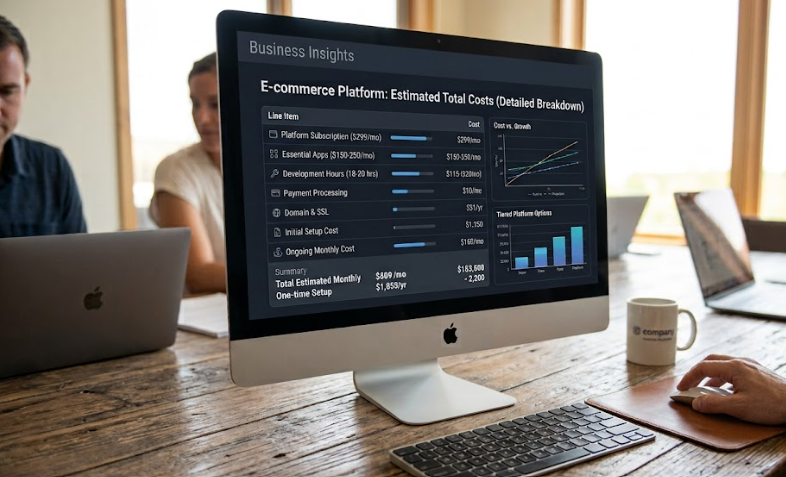
An ecommerce website can cost a few hundred dollars for a self-built store or tens of thousands for a custom Shopify site. The difference comes from the features, content, integrations, and support the business needs.

When analyzing how much does an Ecommerce website cost, enterprise merchants must look past initial launch expenses and evaluate long-term operational overhead. A storefront that appears budget-friendly during the blueprint phase can rapidly become a financial bottleneck when custom product components, ERP integrations, or ongoing maintenance are tacked on without a technical roadmap.

How Much Does an Ecommerce Website Cost

How Much Does an Ecommerce Website Cost for a Basic Store?

A basic store usually has a focused product range, a standard Shopify theme, limited apps, and straightforward shipping rules.

A lean self-built launch can often fall around $500 to $2,000 for initial setup, depending on whether you pay for a theme, product photography, copy, and setup help. A professionally configured small Shopify store may fall around $3,000 to $10,000 when it needs branded pages, stronger product content, and careful mobile setup.

These are broad planning ranges, not standard market prices. They assume a small, single-market store and exclude inventory, packaging, advertising, tax advice, payment-processing charges, and fulfilment costs. A larger catalogue, multi-currency setup, custom integrations, or migration work can raise the final quote.

Securing an expert ecommerce cost planning consultation prevents brands from over-engineering features that add zero operational value. 

The Main Costs Behind an Ecommerce Website

Some costs happen once during setup, while others continue each month or whenever the store changes.

Cost Area What It Covers Budget Effect
Platform and domain Shopify subscription, domain, and transaction-related charges Recurring
Theme or template Store layout, page structure, and navigation One-time or recurring
Design and content Branding, product photography, copy, and banners Usually upfront
Development Theme changes, product logic, integrations, and data work Upfront, sometimes ongoing
Apps and tools Reviews, subscriptions, search, email, or shipping tools Usually recurring
Maintenance Bug fixes, updates, app reviews, and technical improvements Ongoing

The defining factor of your long-term balance sheet is not your SaaS subscription fee, but whether your operational workflows can survive on stock theme architecture or demand heavy custom development.

Theme, Template, or Custom Website Build?

A pre-built theme is usually the lower-cost option because much of the store structure already exists. It can work well when product pages, collections, and checkout follow a conventional pattern.

While deploying a generic shopify starter storefront template can expedite a minor product launch, it inherently limits scalability. As complexity scales, investing in specialized ecommerce store visual design becomes mandatory-transforming rigid, pre-built templates into dynamic UX components that actively remove conversion friction.

What Makes an Ecommerce Website More Expensive?

The answer to how much does an Ecommerce website cost changes quickly once the store needs functionality beyond a standard theme.

Costs rise when you need:

  • Multiple currencies, languages, or regional storefront changes
  • Large catalogues with detailed filtering
  • Subscriptions, bundles, or custom product builders
  • Custom cart rules, discounts, or shipping logic
  • ERP, warehouse, CRM, or fulfilment integrations
  • Data migration from another ecommerce platform
  • B2B pricing, account approval, or wholesale ordering

Commissioning a specialized custom Shopify store build becomes an operational necessity the moment your tech stack requires deeply tailored API integrations, custom middleware, or automated operational logic that a brittle stack of third-party apps cannot reliably handle.

Do Not Forget Ongoing Ecommerce Costs

The first build cost is only one part of the overall budget. Monthly costs may include the Shopify plan, app subscriptions, transaction charges, email tools, inventory software, customer-support tools, and maintenance.

Review apps regularly. A tool that was useful during launch may no longer be needed. A growing catalogue, however, may need better search, inventory tools, or shipping setup.

New campaigns, app updates, and customer feedback can require storefront changes. For complex features or third-party connections, custom Shopify functionality may be preferable to several apps with overlapping purposes.

How to Set a Realistic Budget

Separate essential launch requirements from optional improvements. Essential work includes a usable theme, complete product pages, payment and shipping setup, mobile testing, policies, and order emails. Optional work may include advanced animations, interactive quizzes, or integrations that are not necessary on day one.

Ask potential partners what is included in the estimate. Confirm the number of templates, product pages, revisions, app setups, integrations, and testing stages. Also ask what will be billed separately after launch.

A low quote may suit a simple store. It becomes expensive when important requirements are left out and added later as urgent fixes.

How Much Does an Ecommerce Website Cost Over Time?

For brands asking how much does an Ecommerce website cost, the better question is whether the budget fits the store’s needs and future plans. A practical first version can launch with a strong product structure and dependable checkout, then add features when the business can justify them.

Zissu Global helps scaling enterprise brands navigate the technical complexities of how much does an Ecommerce website cost, architecting custom storefronts and backend integrations tailored directly to your operational infrastructure.

How Can I Improve Ecommerce Conversions: Practical Steps for Shopify Stores

how can i improve ecommerce conversions

More traffic does not automatically lead to more sales. Visitors may reach a product page or begin checkout, then leave because something feels unclear, slow, expensive, or difficult.

Instead of guessing how can I improve ecommerce conversions through random design updates, you must systematically audit the technical buying journey to locate leaks in your funnel.

how can i improve ecommerce conversions

How Can I Improve Ecommerce Conversions: Start With the Customer Journey

Review the landing page, collection page, product page, cart, checkout, and confirmation page. Find the step where customers stop moving forward.

A visitor who exits a collection page may not be able to find the right item. A shopper who leaves after adding an item to cart may be reacting to delivery costs, discount-code hunting, or payment issues. Analytics, support questions, search terms, and session recordings can show what needs attention.

True CRO shifts the focus from vanity metrics to micro-conversions across the stack. If your team is tracking multiple UX and performance anomalies, investing in dedicated shopify CRO consulting isolates core architectural flaws before you touch a single line of code.

Journey Stage Question to Ask Common Issue
Product discovery Can shoppers find a suitable item quickly? Weak categories, filters, or search
Product evaluation Do they have enough information to decide? Unclear images, fit, price, or delivery details
Cart and checkout Can they complete the purchase without surprises? Hidden costs, long forms, or limited payment options

Make Product Pages Easier to Understand

Product pages should explain what the item is, who it is for, why it is worth the price, and when it will arrive.

Lead with clear images, a specific title, price, and product options. Include the details shoppers need to decide: materials, dimensions, fit, compatibility, care instructions, and what is included. Keep delivery and returns information near the add-to-cart area.

Avoid vague claims. Explain the material, design feature, or use case that supports the purchase.

When a product page suffers from high bounce rates or mobile friction, rebuilding your Shopify page layout ensures structural clarity. Seeking dedicated Shopify product-page design support allows you to bypass generic theme limitations and build high-converting custom templates.

Reduce Cart and Checkout Obstacles

Customers often leave when the final cost becomes clear. Make shipping rates, delivery times, return terms, and payment options visible before checkout wherever possible.

Keep the cart page focused. A coupon field can be useful, but it should not be the most noticeable element if it encourages shoppers to leave and search for a code. Offer guest checkout, show familiar payment methods, and avoid requesting information that is not needed to fulfill the order.

Test checkout on mobile and desktop. Check address entry, shipping choices, discount codes, payment authorization, confirmation emails, and post-purchase pages. A broken field, unexpected charge, or missing payment method can stop an otherwise interested customer.

When scaling demands advanced cart logic, complex bundling, or custom upsells, relying on bloated third-party apps will destroy your performance. Instead, commissioning tailored Shopify custom feature development allows you to deploy lightweight, native liquid solutions built for high-volume checkouts.

Improve Mobile Experience and Page Speed

Mobile shoppers notice crowded layouts and slow pages quickly. Slow product galleries and buried add-to-cart buttons can make buying harder.

Check the mobile versions of your home, collection, product, cart, and checkout pages. Buttons should be easy to tap, product options should be simple to select, and essential details should appear before long promotional sections.

Review the app list and remove tools that no longer serve a clear purpose. If your team is analyzing how can i improve ecommerce conversions, removing large images, unused scripts, and overloaded themes is a critical step, as fast pages help visitors compare variants and reach checkout without friction.

A Shopify storefront speed optimization review can identify image, code, or app issues that affect loading time and shopping behavior.

Add Trust Where Customers Need It

Trust should appear at decision points, not only on the home page. Product reviews, accurate delivery estimates, clear returns information, visible contact details, and real product photography help shoppers understand what to expect.

Use social proof carefully. A few useful reviews on a product page are often more helpful than a large widget that blocks content. When mapping out how can i improve ecommerce conversions, answering repeated questions about sizing, delivery, or returns through clear product copy and targeted FAQs directly resolves pre-purchase hesitation.

Test One Change at a Time

Solving the core question of how can I improve ecommerce conversions rarely requires a nuclear option like a site-wide redesign. Instead, building a structured CRO workflow allows you to isolate high-dropoff steps, execute isolated code updates, and benchmark the delta.

Test an improved image order, clearer delivery details, a shorter product-page layout, or a different cart message. Avoid changing the page, offer, traffic source, and email flow together, because it becomes difficult to identify what affected the result.

Track add-to-cart rate, checkout completion, average order value, return rate, and the questions customers ask before purchase.

How Can I Improve Ecommerce Conversions Over Time?

For merchants asking how can I improve ecommerce conversions, fix the clearest obstacle first, test a practical solution, and use the result to decide the next priority.

Zissu Global helps Shopify merchants improve product pages, checkout paths, design, and store performance so customers can buy with fewer obstacles.

Ecommerce Fraud Prevention: Practical Steps for Shopify Merchants

ecommerce fraud prevention

Ecommerce fraud can cost more than the value of a lost order. It can lead to chargebacks, inventory loss, fulfilment costs, support time, and payment-processing problems. Overly cautious checks can also delay legitimate orders.

Ecommerce fraud prevention works best when merchants combine clear policies, order-review rules, secure account access, and reliable fulfilment records. The goal is not to block every unusual order. It is to identify higher-risk activity without creating unnecessary friction for genuine customers.

Ecommerce Fraud Prevention

Ecommerce Fraud Prevention Starts With the Risks Your Store Faces

Fraud patterns differ between low-value stores and high-ticket brands. Review the orders, returns, and disputes your store has already received before deciding where to focus.

Common issues include stolen-card orders, card testing, return abuse, false delivery claims, and customers disputing charges after receiving the product. Reducing customer disputes at this stage depends heavily on clear service, delivery transparency, and explicit refund practices.

Create a simple log for suspicious orders, cancellations, refunds, and disputes. Record the order value, payment method, shipping destination, risk signals, and final outcome. This can show whether the problem is linked to a product, campaign, location, or recurring order pattern.

Set a Clear Process for Reviewing Higher-Risk Orders

Do not leave fraud decisions to guesswork or whichever team member sees the order first. Define when an order should be held for review and what information staff should check.

For example, review orders with unusually high value, several failed payment attempts, rushed delivery requests, a billing and shipping mismatch, or a sudden increase in purchases from the same device or address. One signal alone does not always mean fraud. Several signals together may justify a closer look.

Order Signal Why It May Matter Practical Response
Several payment attempts May indicate card testing or payment trouble Trigger temporary fulfillment hold and audit order log
Unusually high order value Raises the cost of a bad approval Confirm payment status and delivery details
Billing and shipping mismatch Can be legitimate, but needs context Cross-reference device ID and geolocation data prior to release
Repeated orders to one address May indicate repeat fraud or a real customer Review timing, payment methods, and history
Urgent shipping requests Can pressure staff to skip checks Follow the normal review process before dispatch

Give staff a short checklist so every held order receives the same review. It may include payment status, customer order history, address details, delivery method, and notes already recorded by support.

When scaling checkout volume makes manual vetting impossible, establishing a rigorous Shopify operational planning framework ensures your custom workflows handle high-risk signals without bottlenecking fulfillment.

Strengthen Checkout and Account Controls

Use the order-risk tools available in your Shopify setup and make sure the team knows how to respond to flagged activity. Build a process for holding, approving, cancelling, or refunding an order, including who can make the final decision.

Require two-step authentication for every staff account, remove access when someone leaves, and review app permissions regularly. A compromised admin account can expose customer data, change payout details, or create fraudulent discounts.

Where your payment setup allows it, use a defined hold or manual-capture process for higher-risk orders. This gives staff time to review risk indicators before stock is picked, payment is captured, or an order moves into fulfilment.

Card testing can appear as repeated low-value attempts. Watch for a sudden cluster of failed payments, a high volume of orders with different card details, or unusual traffic to checkout. Do not fulfill questionable orders simply because a payment appears to have gone through.

If your storefront requires complex webhooks or custom checkout rules, implementing specialized Shopify fraud-prevention integrations offers a unified backend architecture, eliminating the need for stacking unrelated third-party apps.

Reduce Disputes With Clear Customer Information

Not every dispute is deliberate fraud. In many cases, a customer triggers a formal chargeback simply because they do not recognize a statement descriptor, cannot locate tracking data, misunderstand a preorder timeline, or receive an item that differs from their expectations.

Make product details, processing times, delivery estimates, return eligibility, and contact details easy to find before checkout. Send order confirmation and shipping emails promptly. Use tracking customers can access without contacting support.

For higher-value orders, retain order confirmations, customer messages, tracking records, delivery confirmation, product-page screenshots, refund history, and inspection notes for returned products. Inspect high-value returns before issuing a refund and document missing accessories or different items.

Train the Team and Review Patterns Regularly

A security workflow is only as strong as its weakest access point. Your customer support, warehouse, and DevOps teams must operate on a unified protocol: knowing precisely when to trigger a fulfillment hold, how to escalate risk data, and how to log technical patterns.

Avoid overly broad rules, such as cancelling every international order or every billing-and-shipping mismatch. They can reject legitimate customers and create lost revenue. Use actual order history to refine thresholds and identify repeated patterns.

Review fraud and dispute activity monthly. Compare chargebacks, cancellations, refund reasons, manual-review rates, and losses by product category, payment method, region, and campaign source. When a pattern appears, update the process before it becomes ongoing.

Ecommerce Fraud Prevention Requires Consistent Store Operations

Ecommerce fraud prevention is not one app or one setting. It is a routine that combines order review, account security, clear customer communication, secure fulfilment, and documented returns.

Start with risks already visible in your orders and disputes. Then apply focused rules, train the team, and keep reviewing the results.  Zissu Global helps Shopify merchants build robust technical workflows and advanced ecommerce fraud prevention systems, ensuring your backend operations remain secure as your store scales.

Ecommerce Analytics Tools: A Practical Guide for Shopify Merchants

ecommerce analytics tools

Ecommerce analytics tools show what happens between a shopper landing on your store and completing an order. They show which channels bring qualified traffic, which products draw attention, where customers leave, and what to test next.

Used well, ecommerce analytics tools turn data into decisions on merchandising, marketing, product pages, checkout, and retention.

Ecommerce Analytics Tools

Start With the Decisions You Need to Make

Your analytics stack should match your technical growth and business complexity, not market trends. While early-stage stores survive on basic baseline sales data, scaling brands require precise product-level analysis, multi-touch campaign attribution, and behavioral mapping. 

Before auditing software, define the exact technical and operational questions your team must answer: 

  • Which traffic sources produce completed orders?
  • Which products have strong views but weak add-to-cart rates?
  • Where do mobile shoppers leave the buying journey?
  • Which campaigns produce revenue after discounts, returns, and shipping costs?
  • Which customer groups return and buy again?

Web analytics is the measurement and analysis of website data. For an online store, it should guide improvements to merchandising, marketing, product pages, or checkout.

Ecommerce Analytics Tools to Consider

Most Shopify stores need a small stack for sales, acquisition, behavior, and retention. The right ecommerce analytics tools answer specific business questions without creating duplicate reporting.

Tool Type Best For What It Helps You Review Useful Starting Metrics
Shopify analytics and reports Store-level sales and customer reporting Sales, orders, products, customers, and store activity Net sales, average order value, returning customer rate
Web analytics platform Traffic-source and campaign attribution Landing-page performance, campaign activity, and ecommerce events Sessions, conversion rate, add-to-cart rate, checkout rate
Behavior analytics tool Finding page-level friction How visitors click, scroll, and move through key pages Repeated clicks, scroll depth, form issues, product-page friction
Email and SMS reporting Measuring retention and campaign results Revenue, repeat purchases, and campaign engagement Revenue by campaign, repeat order rate, unsubscribe rate
Product and profitability reporting Reviewing product-level performance Product demand, stock movement, discount impact, and profitability Units sold, return rate, gross margin, discount rate

Together, ecommerce analytics tools support page-level and product-level analysis. Start with reporting already in your stack, then add another platform only when it answers a question the current setup cannot.

Shopify Analytics covers sales, sessions, orders, customers, and products. Web analytics platforms add campaign and event data, while heatmaps and session recordings can explain behavior behind the numbers.

Track the Full Shopping Journey

Do not look only at sales or overall conversion rate. Use ecommerce analytics tools to review product views, add-to-cart actions, checkout starts, purchases, refunds, and returns. Compare each stage by device, traffic source, campaign, product category, and landing page.

Weak add-to-cart activity can point to unclear images, sizing, delivery details, or value. Weak checkout completion can point to shipping costs, payment methods, discount-code searching, or checkout friction.

When you are drowning in data but lacking clear development priorities, running a structured Shopify conversion analysis prevents the costly mistake of altering critical storefront code blindly. 

Check Data Quality Before Making Decisions

Reliable ecommerce analytics tools depend on consistent tracking. Confirm that product views, add-to-cart actions, checkout steps, purchases, refunds, and campaigns are recorded correctly. Test after theme changes, app installations, checkout updates, or new landing pages.

Use consistent names for campaigns, discount codes, product categories, and content tags. Have one person or team own reporting and document changes.

Product builders, subscriptions, bundles, quizzes, and third-party integrations often break standard event tracking. Leveraging specialized shopify integration services ensures that your custom tech stack correctly captures the conversion actions that matter. 

Use Behavior Tools With a Clear Purpose

Heatmaps and session recordings show where visitors hesitate, click repeatedly, or miss key information. Use them when a conversion metric identifies a problem but context is needed before changing a page.

Review mobile sessions that reached a product page but did not add an item to cart. Check whether shoppers use the size guide, get stuck on a variant, or leave after a pop-up appears.

Use privacy, consent, and data-masking controls. Keep recordings away from fields where sensitive information could be entered.

Include Store Speed in Your Analytics Review

Ecommerce analytics tools can reveal a device-specific gap, such as weaker mobile engagement or lower conversion on a particular page. Slow galleries, heavy videos, scripts, or app conflicts can weaken results even when the product and offer are sound.

Review performance after new apps, theme edits, campaigns, or rich-media updates. Shopify storefront speed optimization is relevant when performance data and customer behavior point to loading issues.

Ecommerce Analytics Tools

Create a Weekly Ecommerce Analytics Tools Routine

Your ecommerce analytics tools review should cover revenue, conversion rate, average order value, top products, refund rate, traffic by channel, and mobile-versus-desktop performance. Choose one question to investigate.

Document the issue, make one practical change, and compare the result against a similar period. Avoid changing page design, product price, campaign audience, and shipping offer at the same time.

Keep a record of the question, change, and outcome. It shows what improves the store and what should be left alone.

Conclusion

Ecommerce analytics tools are useful when they help merchants choose a clear next action. Start with sales and traffic reporting, add behavior tools where needed, and maintain accurate tracking as the store changes.

Zissu Global helps Shopify merchants connect analytics findings to practical improvements in product pages, checkout flow, technical tracking, and storefront performance.