What is the best design tool for Shopify stores? For most merchants, the best starting point is Shopify’s built-in Theme Editor. It lets you adjust the sections, settings, and templates your current theme makes available, including content layout, colors, typography, and selected product-page elements.
The right tool depends on the work you need to do. A page builder may be useful for a campaign landing page, while Figma is better for planning a custom storefront before development starts. The best option is the one that gives your team enough control without making the store slow, inconsistent, or difficult to maintain.
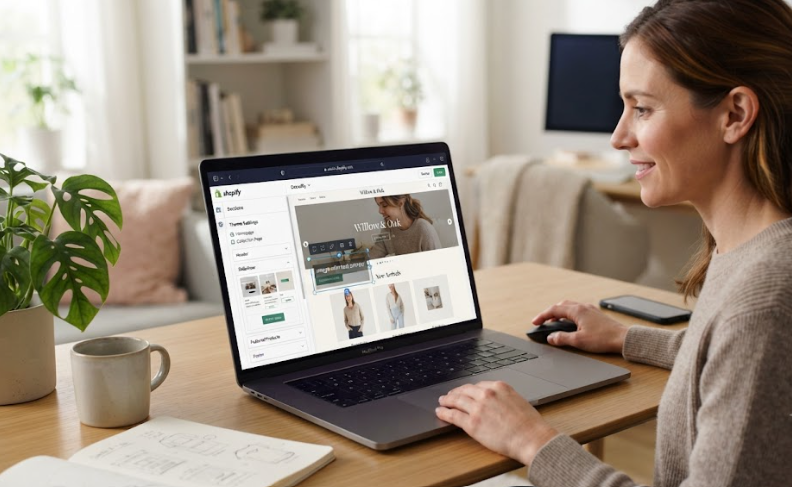
What Is the Best Design Tool for Shopify Stores for Most Merchants?
For everyday storefront updates, Shopify Theme Editor is usually the best design tool for Shopify stores. It works directly with your active theme, which helps maintain a consistent visual style across your homepage, product pages, collection pages, and standard content pages.

Many current Shopify themes use reusable sections, blocks, and templates. This makes it possible to make meaningful design updates without changing theme code or relying on multiple third-party apps.
Use Shopify Theme Editor when you need to:
- Update homepage banners, image sections, product highlights, and calls to action
- Rearrange sections to improve page flow
- Adjust colors, typography, buttons, and spacing
- Edit available product, collection, blog, or standard-page templates
- Check desktop and mobile layouts before publishing
- Keep your storefront design aligned with the rest of the theme
Shopify’s Theme Editor lets merchants customize available theme settings and manage content through sections and blocks. However, the exact controls available depend on the theme you use.
For many stores, learning the full capability of the existing theme is more valuable than adding another design app immediately.
Use a Shopify Page Builder for Campaign-Specific Layouts
A page builder is not automatically the best design tool for Shopify stores. It is most useful when you need a page structure that your theme cannot create cleanly.
For example, a page builder may be worth considering for:
- Product-launch landing pages
- Seasonal promotion pages
- Bundle or gift-guide pages
- Long-form product education pages
- Comparison pages
- Paid-ad campaign landing pages
- One-product sales funnels
A page builder can provide more layout flexibility than a standard Shopify template. It may let you add custom visual sections, testimonials, comparison tables, offer banners, product bundles, and campaign-specific calls to action without requiring a complete custom build.
However, use page builders carefully. A separate page should still look and feel like part of your Shopify store. Match the site’s typography, button styles, image treatment, and spacing so customers do not feel that they have landed on a disconnected microsite.
Before choosing a page builder, test whether it can deliver:
| Requirement | Why It Matters |
|---|---|
| Mobile editing controls | Most shoppers will review the page from a phone |
| Fast page loading | Heavy design elements can reduce usability and conversion potential |
| Theme consistency | The campaign should still look like part of the same brand |
| App compatibility | Product reviews, subscriptions, bundles, and other apps should work correctly |
| Easy maintenance | Your team should be able to update or remove the page later |
Use Figma When You Are Planning a Custom Shopify Store
Figma is often the best design tool for Shopify stores when the project is larger than a few storefront edits. It is best used before development, when your team needs to review the proposed shopping experience and agree on the visual direction.
Before development, a Figma design can start with a wireframe that helps your team agree on:
- Homepage structure and promotional hierarchy
- Navigation and mega-menu behavior
- Product-page layout and product-information priority
- Collection filters and merchandising rules
- Mobile shopping flow
- Cart presentation and upsell placement
- Typography, colors, buttons, spacing, and image direction
Figma does not replace Shopify. It gives your team a place to make design decisions before those decisions affect the live store.
For a custom redesign, the strongest process is usually:
- Plan the customer journey and page hierarchy.
- Create and approve the design direction in Figma.
- Confirm what can be handled by the existing Shopify theme.
- Develop the necessary custom features.
- Test the live storefront across mobile, desktop, and key conversion paths.
This approach avoids making major brand decisions inside a live theme editor.
Choose the Tool Based on the Work, Not the Trend
If you are still asking what is the best design tool for Shopify stores, use the scope of the change as your filter. The best option is not always the newest app or the most flexible builder.
When You Need Better Everyday Store Design
Use Shopify Theme Editor first. Review your homepage, collection pages, product pages, navigation, and cart experience. Look for friction that makes it harder for customers to understand products, compare options, trust the store, or move toward checkout.
Often, a clearer product-information order, stronger call to action, improved collection structure, or more effective homepage hierarchy matters more than a complete visual rebuild.
When You Need a High-Converting Campaign Page
Use a page builder when the campaign requires a custom story that your theme cannot support well. Keep the page focused on one customer group, one offer, and one action you want visitors to take.
Avoid using a page builder only because the standard product template feels limited. First check whether a revised theme template or a custom section could solve the issue with less complexity.
When You Need a New Brand Experience
Use Figma and custom Shopify development when the whole storefront needs to change. This is the right route when your current theme cannot support the desired navigation, product-page architecture, content modules, or branded customer journey.
A successful Shopify website designproject connects your visual branding with fast loading times, clear merchandising, and clean mobile shopping loops, instead of treating design as decoration.
Avoid Adding Too Many Design Tools
The best design tool for Shopify stores is rarely a stack of overlapping apps. Multiple design tools can create inconsistent styling, conflicting settings, duplicated scripts, slower pages, and a storefront that only one person knows how to edit.
Before installing a new tool, ask:
- Can the current theme already support this change?
- Does the change affect one campaign or the entire storefront?
- Will the new tool keep the mobile experience clean?
- Who will maintain the page after launch?
- Can the page be removed later without disrupting other store elements?
These questions help prevent a temporary campaign solution from becoming a long-term maintenance problem.
Design Tools Still Need Conversion Strategy
A design tool cannot fix a confusing offer, weak product copy, poor navigation, unclear shipping information, or a difficult checkout path. Design should make it easier for shoppers to understand the product, trust the store, and take the next step.
When a store redesign aims to grow revenue, you need to review the buyer journey alongside the visuals. Running a practical Shopify CRO consulting audit helps pinpoint whether your visitors are dropping off due to confusing layouts, hidden product details, mobile layout friction, or cart leaks.
Conclusion: What Is the Best Design Tool for Shopify Stores?
What is the best design tool for Shopify stores? Shopify Theme Editor is the best default choice for most storefront updates because it works within your active theme and supports consistent, manageable changes. Use a page builder for genuinely unique campaign pages, and use Figma when you need to plan a custom Shopify experience before development begins.
The best tool is the simplest one that helps your team create a clear, fast, consistent shopping experience. For merchants planning a major storefront update, Zissu Global helps turn design decisions into reliable workflows and conversion-focused Shopify stores that make it easy for customers to buy.